SpringBoot Environment

SpringBoot Environment


在SpringBoot中,每个ApplicationContext都有相应的环境信息,比如AbstractApplicationContext中就有private ConfigurableEnvironment environment; Environment 可以理解为一些环境上下文,也就是存储了当前运行环境的各种属性。

下面就看看Environment到底是什么,以及在初始化的时候,他做了哪些相关工作。


背景类介绍


Environment && PropertyResolver


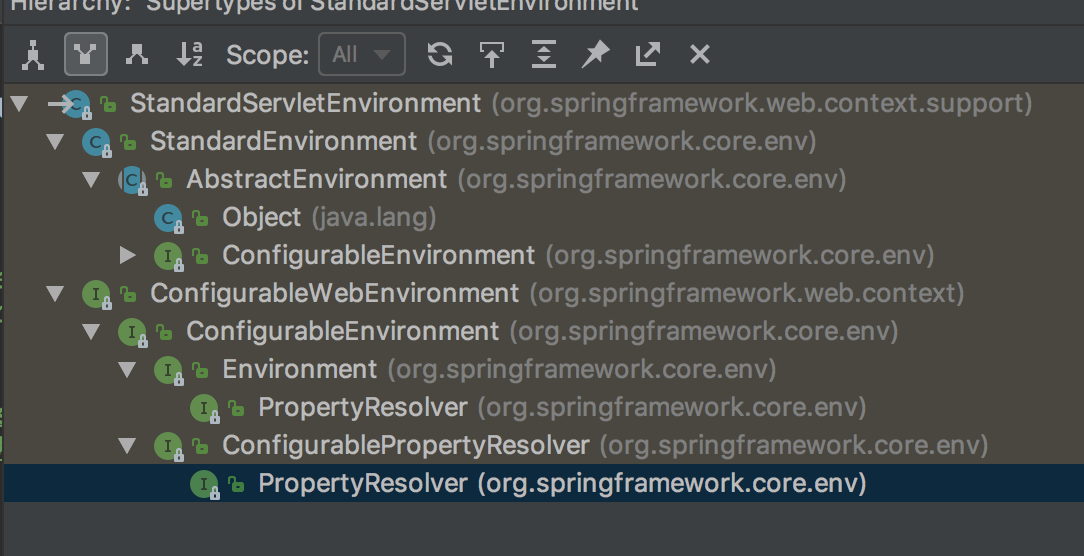
我们常使用的Environment就是StandardServletEnvironment ,那么首先我们就看看该类的体系结构。
|center

可以看到,StandardServletEnvironment 继承自 StandardEnvironment,实现了ConfigurableWebEnvironment接口。而再往下还有很多的接口定义和抽象类,下面我们都来看看。

  • PropertyResolver 提供了访问属性的接口定义,忽略底层resource的实现。
  • Environment 继承自PropertyResolver,提供访问和判断profiles的功能。
  • ConfigurablePropertyResolver 继承自PropertyResolver,主要提供属性类型转换(基于org.springframework.core.convert.ConversionService)功能。定义了get|setConversionService,setValueSeparator,setPlaceholderPrefix|Suffix等方法,就是丰富了解析的功能。
  • ConfigurableEnvironment 继承自ConfigurablePropertyResolver和Environment,并且提供设置激活的profile和默认的profile的功能。
  • ConfigurableWebEnvironment 继承自ConfigurableEnvironment,并且提供配置Servlet上下文和Servlet参数的功能。
  • AbstractEnvironment 实现了ConfigurableEnvironment接口,提供默认属性和存储容器的定义,并且为子类预留可覆盖了扩展方法。
  • StandardEnvironment 继承自AbstractEnvironment,非Servlet(Web)环境下的标准Environment实现。
  • StandardServletEnvironment 继承自StandardEnvironment,Servlet(Web)环境下的标准Environment实现。


如果有不是特别清楚的,可以结合代码看看每个类中方法的定义,就可以理解上面各个类的功能了。


PropertyResource


AbstractEnvironment中,用来保存环境中各种属性的就是MutablePropertySources。下面从MutablePropertySources入手,了解整个PropertyResource

1
2
3
4
5
6
7
8
9
10
11
/**
* 该类提供了PropertySources的具体实现(也是唯一的),里面保存的是一个CopyOnWriteArrayList<PropertySource<?>>的数组。
* 而且好提供了各种方法,用来插入、删除 list中的元素 PropertySource
*/
public class MutablePropertySources implements PropertySources {

// 这里定义了对多个PropertySource的真正数据结构是 CopyOnWriteArrayList<ropertySource<?>>
private final List<PropertySource<?>> propertySourceList = new CopyOnWriteArrayList<>();

...
}

下面再看看 PropertySources

1
2
3
4
5
6
7
8
9
10
11
12
13
14
15
16
17
18
19
20
21
22
23
24
25
26
27
28
/**
* 就是定义了多个PropertySource,和containers 和 PropertySource get这种操作
*
*/
public interface PropertySources extends Iterable<PropertySource<?>> {

/**
* Return a sequential {@link Stream} containing the property sources.
* @since 5.1
*/
default Stream<PropertySource<?>> stream() {
return StreamSupport.stream(spliterator(), false);
}

/**
* Return whether a property source with the given name is contained.
* @param name the {@linkplain PropertySource#getName() name of the property source} to find
*/
boolean contains(String name);

/**
* Return the property source with the given name, {@code null} if not found.
* @param name the {@linkplain PropertySource#getName() name of the property source} to find
*/
@Nullable
PropertySource<?> get(String name);

}


最后看看PropertySource,这里面还是有点东西的。

1
2
3
4
5
6
7
8
9
10
11
12
13
14
15
16
17
18
19
20
21
22
23
24
25
26
27
28
29
30
31
32
33
34
35
36
37
38
39
40
41
42
43
44
45
46
47
48
49
50
51
52
53
54
55
56
57
58
59
60
61
62
63
64
65
66
67
68
69
70
71
72
73
74
75
76
77
78
79
80
81
82
83
84
85
86
87
88
89
90
91
92
93
94
95
96
97
98
99
100
101
102
103
104
105
106
107
108
109
110
111
112
113
114
115
116
117
118
119
120
121
122
123
124
125
126
127
128
129
130
131
132
133
134
135
136
137
138
139
140
141
142
143
144
145
146
public abstract class PropertySource<T> {

protected final String name;

protected final T source;

public PropertySource(String name, T source) {
Assert.hasText(name, "Property source name must contain at least one character");
Assert.notNull(source, "Property source must not be null");
this.name = name;
this.source = source;
}

@SuppressWarnings("unchecked")
public PropertySource(String name) {
this(name, (T) new Object());
}


public String getName() {
return this.name;
}

public T getSource() {
return this.source;
}

/**
* Return whether this {@code PropertySource} contains the given name.
* <p>This implementation simply checks for a {@code null} return value
* from {@link #getProperty(String)}. Subclasses may wish to implement
* a more efficient algorithm if possible.
* @param name the property name to find
*/
public boolean containsProperty(String name) {
return (getProperty(name) != null);
}

/**
* Return the value associated with the given name,
* or {@code null} if not found.
* @param name the property to find
* @see PropertyResolver#getRequiredProperty(String)
*/
@Nullable
public abstract Object getProperty(String name);


// equals 和 hashCode 都只和 name 属性相关
@Override
public boolean equals(Object other) {
return (this == other || (other instanceof PropertySource &&
ObjectUtils.nullSafeEquals(this.name, ((PropertySource<?>) other).name)));
}
@Override
public int hashCode() {
return ObjectUtils.nullSafeHashCode(this.name);
}


// 把String类型的name转换为一个可以判断存在与否的 ComparisonPropertySource
// 正好 判断 equals 只根据name,所以这里也是妥妥的
/**
* Return a {@code PropertySource} implementation intended for collection comparison purposes only.
* <p>Primarily for internal use, but given a collection of {@code PropertySource} objects, may be
* used as follows:
* <pre class="code">
* {@code List<PropertySource<?>> sources = new ArrayList<PropertySource<?>>();
* sources.add(new MapPropertySource("sourceA", mapA));
* sources.add(new MapPropertySource("sourceB", mapB));
* assert sources.contains(PropertySource.named("sourceA"));
* assert sources.contains(PropertySource.named("sourceB"));
* assert !sources.contains(PropertySource.named("sourceC"));
* }</pre>
* The returned {@code PropertySource} will throw {@code UnsupportedOperationException}
* if any methods other than {@code equals(Object)}, {@code hashCode()}, and {@code toString()}
* are called.
* @param name the name of the comparison {@code PropertySource} to be created and returned.
*/
public static PropertySource<?> named(String name) {
return new ComparisonPropertySource(name);
}


/**
* {@code PropertySource} to be used as a placeholder in cases where an actual
* property source cannot be eagerly initialized at application context
* creation time. For example, a {@code ServletContext}-based property source
* must wait until the {@code ServletContext} object is available to its enclosing
* {@code ApplicationContext}. In such cases, a stub should be used to hold the
* intended default position/order of the property source, then be replaced
* during context refresh.
* 上面的注释也写的很清楚了,就是用来占位的,因为有一些PropertySource的初始化较晚,比如说 ServletContext相关的环境,在
* 初始化的时候是没有的,可以用改对象来占位。
* @see org.springframework.context.support.AbstractApplicationContext#initPropertySources()
* @see org.springframework.web.context.support.StandardServletEnvironment
* @see org.springframework.web.context.support.ServletContextPropertySource
*/
public static class StubPropertySource extends PropertySource<Object> {

public StubPropertySource(String name) {
super(name, new Object());
}

/**
* Always returns {@code null}.
*/
@Override
@Nullable
public String getProperty(String name) {
return null;
}
}


/**
* PropertySource.named(String) 返回的就是该类型的对象。
* 该子类是专门用来封装String类型的name,做比较的,而且他的所有getSource等相关方法,全都是抛出异常
*/
static class ComparisonPropertySource extends StubPropertySource {

private static final String USAGE_ERROR =
"ComparisonPropertySource instances are for use with collection comparison only";

public ComparisonPropertySource(String name) {
super(name);
}

@Override
public Object getSource() {
throw new UnsupportedOperationException(USAGE_ERROR);
}

@Override
public boolean containsProperty(String name) {
throw new UnsupportedOperationException(USAGE_ERROR);
}

@Override
@Nullable
public String getProperty(String name) {
throw new UnsupportedOperationException(USAGE_ERROR);
}
}

}

这个PropertySource类和map这种的用来存储键值对的类稍微有一点不一样,PropertySource中的source是随意类型的,而且key-value都是存在source里面的。可以简单的看一下常用的两个实现MapPropertySource,

1
2
3
4
5
6
7
8
9
10
11
12
13
14
15
16
17
18
19
20
21
22
23
24
25
26
27
28
29
30
31
32
33
34
35
36
37
public class MapPropertySource extends EnumerablePropertySource<Map<String, Object>> {

public MapPropertySource(String name, Map<String, Object> source) {
super(name, source);
}

@Override
@Nullable
public Object getProperty(String name) {
return this.source.get(name);
}

@Override
public boolean containsProperty(String name) {
return this.source.containsKey(name);
}

@Override
public String[] getPropertyNames() {
return StringUtils.toStringArray(this.source.keySet());
}

}


public class PropertiesPropertySource extends MapPropertySource {

@SuppressWarnings({"unchecked", "rawtypes"})
public PropertiesPropertySource(String name, Properties source) {
super(name, (Map) source);
}

protected PropertiesPropertySource(String name, Map<String, Object> source) {
super(name, source);
}

}


最后,我们知道AbstractEnvironment中存储的是MutablePropertySources, 是一个数组,那么在Environment中怎么getProperty的呢?

1
2
3
4
5
6
7
8
9
10
11
12
13
14
15
16
17
18
19
20
21
22
23
24
25
26
27
28
29
30
31
32
33
34
35
36
37
38
39
40
41
42
43
44
45
46
public abstract class AbstractEnvironment implements ConfigurableEnvironment {

...

private final ConfigurablePropertyResolver propertyResolver =
new PropertySourcesPropertyResolver(this.propertySources);

// 是代理给了 PropertySourcesPropertyResolver propertyResolver
@Override
@Nullable
public String getProperty(String key) {
return this.propertyResolver.getProperty(key);
}
}

public class PropertySourcesPropertyResolver extends AbstractPropertyResolver {

@Nullable
private final PropertySources propertySources;

@Override
@Nullable
public String getProperty(String key) {
return getProperty(key, String.class, true);
}

// 其实就是扫描 PropertySources 中 所有的 PropertySource 查每个PropertySource中是否存在
@Nullable
protected <T> T getProperty(String key, Class<T> targetValueType, boolean resolveNestedPlaceholders) {
if (this.propertySources != null) {
for (PropertySource<?> propertySource : this.propertySources) {
Object value = propertySource.getProperty(key);
if (value != null) {
if (resolveNestedPlaceholders && value instanceof String) {
value = resolveNestedPlaceholders((String) value);
}
logKeyFound(key, propertySource, value);
return convertValueIfNecessary(value, targetValueType);
}
}
}
return null;
}

...
}


源码分析 Environment 的初始化过程

入口点在SpringApplication.run方法的ConfigurableEnvironment environment = prepareEnvironment(listeners,applicationArguments);

1
2
3
4
5
6
7
8
9
10
11
12
13
14
15
16
17
// environment 在该方法中完成整个初始化
private ConfigurableEnvironment prepareEnvironment(
SpringApplicationRunListeners listeners,
ApplicationArguments applicationArguments) {
// 根据不同的环境创建不同的 Environment 实例
ConfigurableEnvironment environment = getOrCreateEnvironment();
// configEnvironment 为初始化 Environment 准备好数据
configureEnvironment(environment, applicationArguments.getSourceArgs());
listeners.environmentPrepared(environment);
bindToSpringApplication(environment);
if (!this.isCustomEnvironment) {
environment = new EnvironmentConverter(getClassLoader())
.convertEnvironmentIfNecessary(environment, deduceEnvironmentClass());
}
ConfigurationPropertySources.attach(environment);
return environment;
}


1. createEnvironment


首先根据不同的 applicationType 创建不同的Environment,这里创建的是 StandardServletEnvironment

1
2
3
4
5
6
7
8
9
10
11
12
13
private ConfigurableEnvironment getOrCreateEnvironment() {
if (this.environment != null) {
return this.environment;
}
switch (this.webApplicationType) {
case SERVLET:
return new StandardServletEnvironment();
case REACTIVE:
return new StandardReactiveWebEnvironment();
default:
return new StandardEnvironment();
}
}

之前说过,StandardServletEnvironment extends StandardEnvironment, StandardEnvironment extends AbstractEnvironment。所以创建StandardServletEnvironment实例,首先会执行父类AbstractEnvironment的构造方法(因为这里子类没有实现构造方法),它里面又调用了customizePropertySources方法,StandardServletEnvironment实现了该方法,所以又会回来调用这个方法。

创建StandardServletEnvironment实例的代码会按照代码实际的执行顺序,在下面罗列出来。

1
2
3
4
5
6
7
8
9
10
11
12
13
14
15
16
17
18
19
20
21
22
23
24
25
// AbstractEnvironment
public AbstractEnvironment() {
// 留给子类实现 方法添加propertySource
customizePropertySources(this.propertySources);
}

//StandardServletEnvironment
@Override
protected void customizePropertySources(MutablePropertySources propertySources) {
//name=servletConfigInitParams, 给 Servlet configInitParams 占位
propertySources.addLast(new StubPropertySource(SERVLET_CONFIG_PROPERTY_SOURCE_NAME));
// servletContextInitParams 给 Servlet contextInitParams 占位
propertySources.addLast(new StubPropertySource(SERVLET_CONTEXT_PROPERTY_SOURCE_NAME));
if (JndiLocatorDelegate.isDefaultJndiEnvironmentAvailable()) {
propertySources.addLast(new JndiPropertySource(JNDI_PROPERTY_SOURCE_NAME));
}
super.customizePropertySources(propertySources);
}

// StandardEnvironment
protected void customizePropertySources(MutablePropertySources propertySources) {
// systemProperties 放入系统环境 键值对
propertySources.addLast(new MapPropertySource(SYSTEM_PROPERTIES_PROPERTY_SOURCE_NAME, getSystemProperties()));
propertySources.addLast(new SystemEnvironmentPropertySource(SYSTEM_ENVIRONMENT_PROPERTY_SOURCE_NAME, getSystemEnvironment()));
}

为什么要用SubPropertySource占位,而且还要注意顺序呢?

会想一下,Environment.getProperty 的过程,是扫描数组中的每一个PropertySource看是否有该property,所以也会涉及到这几个环境优先级的问题。


2. configEnvironment


1
2
3
4
5
6
7
8
9
10
11
12
13
14
15
16
17
18
19
20
21
22
23
24
25
26
27
28
29
30
31
32
33
34
35
36
37
38
39
40
41
42
43
44
45
46
47
48
49
50
51
52
53
54
55
56
57
58
59
60
61
62
63
64
65
protected void configureEnvironment(ConfigurableEnvironment environment,
String[] args) {
if (this.addConversionService) {
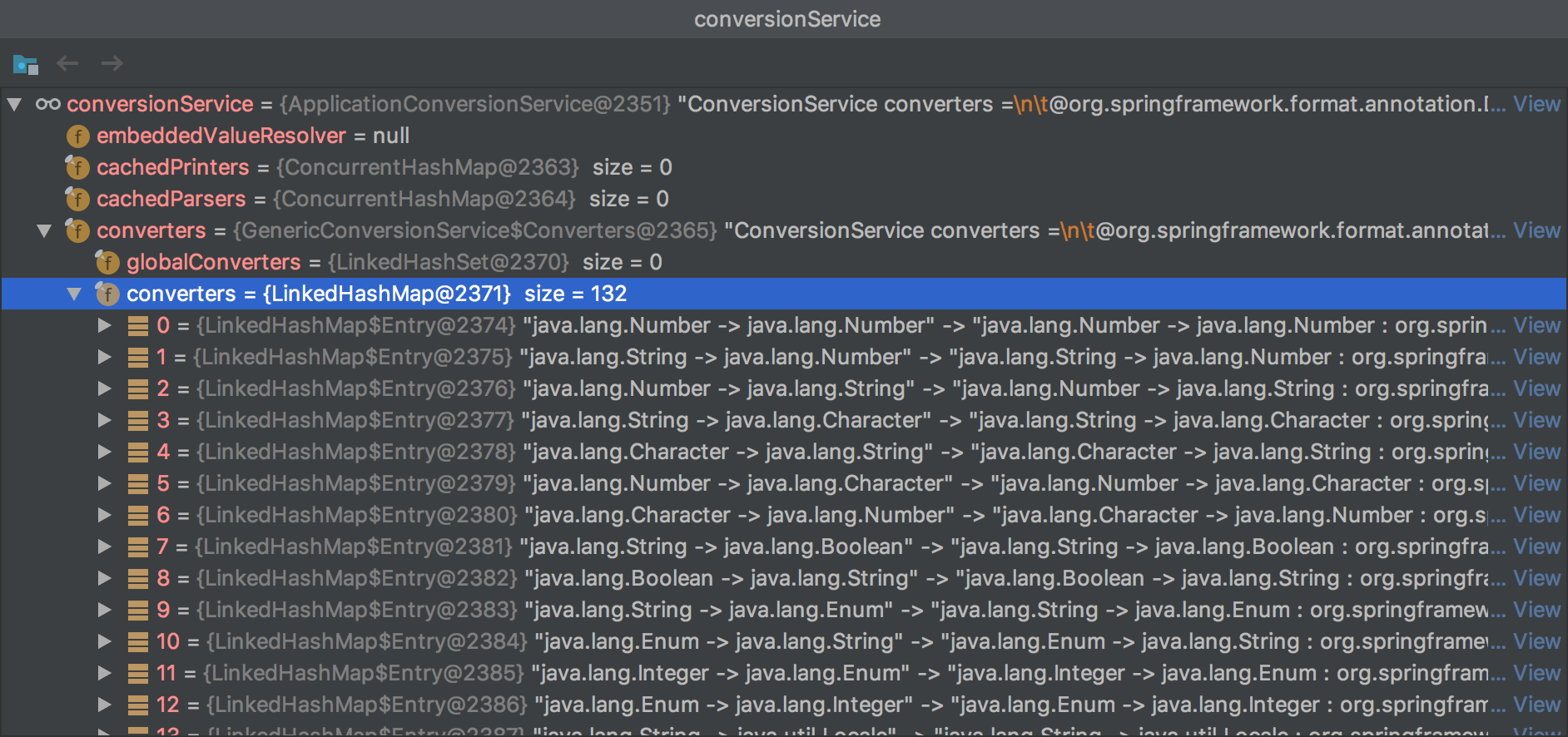
// 创建并 返回 ConversionService,这是一个相当庞大的转换Service,用来在读取配置文件的时候,将各种数据类型转换为合适的数据类型
ConversionService conversionService = ApplicationConversionService
.getSharedInstance();
environment.setConversionService(
(ConfigurableConversionService) conversionService);
}
configurePropertySources(environment, args);
configureProfiles(environment, args);
}

// 如果 运行的时候传入了参数,那么会将它保存在 name=springApplicationCommandLineArgs 的propertySource中
protected void configurePropertySources(ConfigurableEnvironment environment,
String[] args) {
MutablePropertySources sources = environment.getPropertySources();
if (this.defaultProperties != null && !this.defaultProperties.isEmpty()) {
sources.addLast(
new MapPropertySource("defaultProperties", this.defaultProperties));
}
if (this.addCommandLineProperties && args.length > 0) {
String name = CommandLinePropertySource.COMMAND_LINE_PROPERTY_SOURCE_NAME;
if (sources.contains(name)) {
PropertySource<?> source = sources.get(name);
CompositePropertySource composite = new CompositePropertySource(name);
composite.addPropertySource(new SimpleCommandLinePropertySource(
"springApplicationCommandLineArgs", args));
composite.addPropertySource(source);
sources.replace(name, composite);
}
else {
// 如果有的话,默认会将用户传入的配置 放到第一位。
// 所以我们的配置 优先级总是最高的。
// 我们传入的 参数 spring.profiles.active=wyj 就会在这里放入 MutablPropertySources 中
sources.addFirst(new SimpleCommandLinePropertySource(args));
}
}
}

protected void configureProfiles(ConfigurableEnvironment environment, String[] args) {
// 初始化 environment 中的 activeProfiles
environment.getActiveProfiles(); // ensure they are initialized
// But these ones should go first (last wins in a property key clash)
// activePrifiles中加入 ApplicationContext中 额外 用户配置的 additionalProfiles
Set<String> profiles = new LinkedHashSet<>(this.additionalProfiles);
profiles.addAll(Arrays.asList(environment.getActiveProfiles()));
environment.setActiveProfiles(StringUtils.toStringArray(profiles));
}


protected Set<String> doGetActiveProfiles() {
synchronized (this.activeProfiles) {
if (this.activeProfiles.isEmpty()) {
// 会读取到 已经放入到 PropertySources 中,运行程序时 我们传入的参数。
String profiles = getProperty(ACTIVE_PROFILES_PROPERTY_NAME); // spring.profiles.active
if (StringUtils.hasText(profiles)) {
// 这里还可以发现,我们可以传入多个 active profiles,用,分割
setActiveProfiles(StringUtils.commaDelimitedListToStringArray(
StringUtils.trimAllWhitespace(profiles)));
}
}
return this.activeProfiles;
}
}

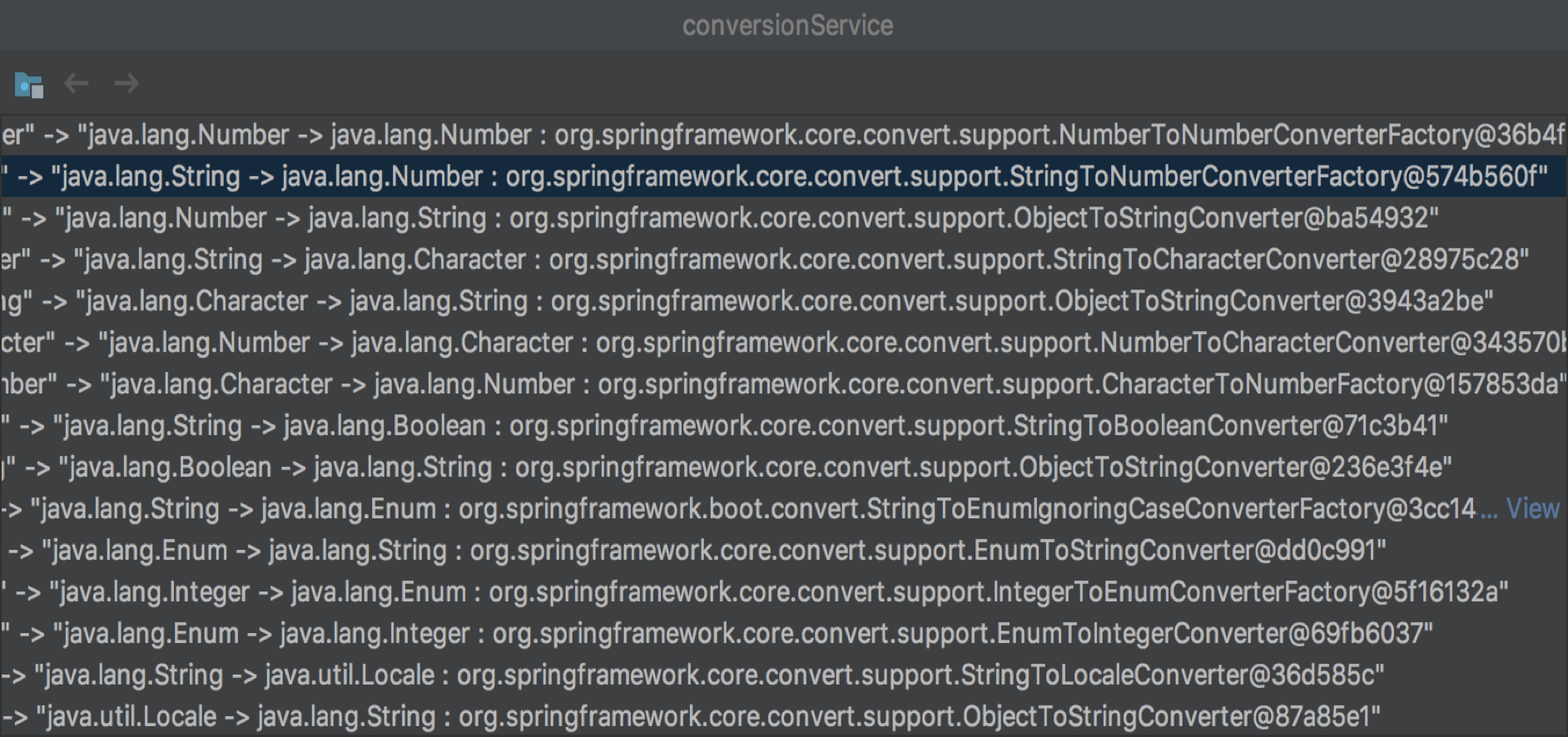
所以他一共干了三件事:

  1. 初始化ConvertService
  2. 读取用户运行程序时传入的配置,并保存在Envrionment
  3. 找到active profiles

下面看看 ConvertService 中 都是什么:
|center

|center


3.1 preLoadProperties


下面就是发出ApplicationEnvironmentPreparedEvent事件。

会有好几个listener,我们关心的是ConfigFileApplicationListener,下面是几个关心的方法:

1
2
3
4
5
6
7
8
9
10
11
12
13
14
15
16
17
18
19
20
21
22
23
24
25
26
27
28
29
30
31
32
33
34
35
36
37
38
39
public class ConfigFileApplicationListener
implements EnvironmentPostProcessor, SmartApplicationListener, Ordered {

// ApplicationEnvironmentPreparedEvent 事件最终会调用该方法
private void onApplicationEnvironmentPreparedEvent(
ApplicationEnvironmentPreparedEvent event) {
List<EnvironmentPostProcessor> postProcessors = loadPostProcessors();
postProcessors.add(this);
AnnotationAwareOrderComparator.sort(postProcessors);
// 调用 EnvironmentPostProcessor 后处理器
for (EnvironmentPostProcessor postProcessor : postProcessors) {
postProcessor.postProcessEnvironment(event.getEnvironment(),
event.getSpringApplication());
}
}

// 使用 FactiriesLoader 加载 EnvironmentPostProcessor
List<EnvironmentPostProcessor> loadPostProcessors() {
return SpringFactoriesLoader.loadFactories(EnvironmentPostProcessor.class,
getClass().getClassLoader());
}

// 注意 他也是 实现了 EnvironmentPostProcessor 接口的
// 而且,也定义在了 spring.factories 中,所以 也会会掉这个方法
@Override
public void postProcessEnvironment(ConfigurableEnvironment environment,
SpringApplication application) {
addPropertySources(environment, application.getResourceLoader());
}

protected void addPropertySources(ConfigurableEnvironment environment,
ResourceLoader resourceLoader) {
// 在 systemEnvironment 后面 添加 name=random,value=new Random(); 的PropertySource
RandomValuePropertySource.addToEnvironment(environment);
new Loader(environment, resourceLoader).load();
}

...
}


3.2 loadProperties


LoaderConfigFileApplicationListener 的内部类。

1
2
3
4
5
6
7
8
9
10
11
12
13
14
15
16
17
18
19
20
21
22
23
24
25
26
27
28
29
30
31
32
33
34
35
36
37
38
39
40
41
42
43
private class Loader {
Loader(ConfigurableEnvironment environment, ResourceLoader resourceLoader) {
this.environment = environment;
this.placeholdersResolver = new PropertySourcesPlaceholdersResolver(
this.environment);
this.resourceLoader = (resourceLoader != null) ? resourceLoader
: new DefaultResourceLoader();
// 找到的 PropertySourceLoader 有两个,分别是 PropertiesPropertySourceLoader和YamlPropertySourceLoader
this.propertySourceLoaders = SpringFactoriesLoader.loadFactories(
PropertySourceLoader.class, getClass().getClassLoader());
}

public void load() {
this.profiles = new LinkedList<>();
this.processedProfiles = new LinkedList<>();
this.activatedProfiles = false;
this.loaded = new LinkedHashMap<>();
// 初始化 profiles
// 首先会加入一个 null
// 如果 activeProfiles 不为null,加入到list中
// 为null,吧defaultProfiles 加入到list中
// 这里 我们配置了了 activeProfiles=wyj,所里里面有两个 一个null,一个 wyj
initializeProfiles();
while (!this.profiles.isEmpty()) {
Profile profile = this.profiles.poll();
if (profile != null && !profile.isDefaultProfile()) {
addProfileToEnvironment(profile.getName());
}
// 第二个参数 this::getPositiveProfileFilter 返回的是一个lambda 表达式的filter ,
// 第三个参数 addToLoaded(MutablePropertySources::addLast, false),addToLoaded 返回的还是一个lambda表达式,整个的作用大概就是将解析出来的数据添加到 propertySources 的最后。
load(profile, this::getPositiveProfileFilter,
addToLoaded(MutablePropertySources::addLast, false));
this.processedProfiles.add(profile);
}
resetEnvironmentProfiles(this.processedProfiles);
load(null, this::getNegativeProfileFilter,
addToLoaded(MutablePropertySources::addFirst, true));
addLoadedPropertySources();
}

...

}


load

1
2
3
4
5
6
7
8
9
10
11
12
13
14
15
16
17
18
19
20
21
22
23
24
25
26
27
28
29
30
31
32
33
34
35
36
37
38
39
40
41
42
43
44
45
46
47
48
49
50
51
52
53
54
55
56
57
58
59
60
61
62
63
64
65
66
67
68
69
70
71
72
73
74
75
76
77
78
79
80
81
82
83
84
85
86
87
88
89
90
91
92
93
94
95
96
97
98
99
100
101
102
103
104
105
106
107
108
109
110
111
112
113
114
115
116
117
118
119
120
121
122
123
124
125
126
127
128
129
130
131
132
133
134
135
136
137
138
139
140
141
142
143
144
145
146
147
148
149
150
151
152
153
154
155
156
157
158
159
160
// 整个代码逻辑 就是:
// 获取所有扫描路径 和 扫描的文件名,然后便利load
private void load(Profile profile, DocumentFilterFactory filterFactory,
DocumentConsumer consumer) {
getSearchLocations().forEach((location) -> {
boolean isFolder = location.endsWith("/");
Set<String> names = isFolder ? getSearchNames() : NO_SEARCH_NAMES;
names.forEach(
(name) -> load(location, name, profile, filterFactory, consumer));
});
}

// 配置文件的路径
private Set<String> getSearchLocations() {
// 首先如果配置了 spring.config.location ,就返回我们配置的路径
if (this.environment.containsProperty(CONFIG_LOCATION_PROPERTY)) {
return getSearchLocations(CONFIG_LOCATION_PROPERTY);
}
// 然后扫描 spring.config.additional-location 所配置的(这是让谁用的?可能是留给三方jar包的接口?)
Set<String> locations = getSearchLocations(
CONFIG_ADDITIONAL_LOCATION_PROPERTY);
// 最后加上默认的扫描路径。DEFAULT_SEARCH_LOCATIONS = classpath:/,classpath:/config/,file:./,file:./config/
locations.addAll(
asResolvedSet(ConfigFileApplicationListener.this.searchLocations,
DEFAULT_SEARCH_LOCATIONS));
return locations;
}

// 配置文件的名字
private Set<String> getSearchNames() {
// 如果配置了 spring.config.name 属性,会返回我们配置的 配置文件名字,
// 注意,这里可以配置多个 试用,分割
if (this.environment.containsProperty(CONFIG_NAME_PROPERTY)) {
String property = this.environment.getProperty(CONFIG_NAME_PROPERTY);
return asResolvedSet(property, null);
}
// 如果没有配置返回默认的 DEFAULT_NAMES=application
return asResolvedSet(ConfigFileApplicationListener.this.names, DEFAULT_NAMES);
}

// 真正的load方法
private void load(String location, String name, Profile profile,
DocumentFilterFactory filterFactory, DocumentConsumer consumer) {
// 这块代码不知道 何时 运行,因为 name 一般不会为空啊
if (!StringUtils.hasText(name)) {
for (PropertySourceLoader loader : this.propertySourceLoaders) {
if (canLoadFileExtension(loader, location)) {
load(loader, location, profile,
filterFactory.getDocumentFilter(profile), consumer);
return;
}
}
}

// loader 有两种,PropertiesPropertySourceLoader和YamlPropertySourceLoader
// 每个loader支持的文件后缀也有两种,分别便利,尝试去加载
Set<String> processed = new HashSet<>();
for (PropertySourceLoader loader : this.propertySourceLoaders) {
for (String fileExtension : loader.getFileExtensions()) {
if (processed.add(fileExtension)) {
loadForFileExtension(loader, location + name, "." + fileExtension,
profile, filterFactory, consumer);
}
}
}
}


private void loadForFileExtension(PropertySourceLoader loader, String prefix,
String fileExtension, Profile profile,
DocumentFilterFactory filterFactory, DocumentConsumer consumer) {
DocumentFilter defaultFilter = filterFactory.getDocumentFilter(null);
DocumentFilter profileFilter = filterFactory.getDocumentFilter(profile);
// 不为空 组织成 prefix-profile.fileExtension的文件,去加载
if (profile != null) {
// Try profile-specific file & profile section in profile file (gh-340)
String profileSpecificFile = prefix + "-" + profile + fileExtension;
load(loader, profileSpecificFile, profile, defaultFilter, consumer);
load(loader, profileSpecificFile, profile, profileFilter, consumer);
// Try profile specific sections in files we've already processed
for (Profile processedProfile : this.processedProfiles) {
if (processedProfile != null) {
String previouslyLoaded = prefix + "-" + processedProfile
+ fileExtension;
load(loader, previouslyLoaded, profile, profileFilter, consumer);
}
}
}
// Also try the profile-specific section (if any) of the normal file
// 为null,组织成 prefix.fileExtension的文件,去加载
// 所以在一开始的profiles中 要加入一个null,来加载 application.yml
load(loader, prefix + fileExtension, profile, profileFilter, consumer);
}


private void load(PropertySourceLoader loader, String location, Profile profile,
DocumentFilter filter, DocumentConsumer consumer) {
try {
Resource resource = this.resourceLoader.getResource(location);
if (resource == null || !resource.exists()) {
if (this.logger.isTraceEnabled()) {
StringBuilder description = getDescription(
"Skipped missing config ", location, resource, profile);
this.logger.trace(description);
}
return;
}
if (!StringUtils.hasText(
StringUtils.getFilenameExtension(resource.getFilename()))) {
if (this.logger.isTraceEnabled()) {
StringBuilder description = getDescription(
"Skipped empty config extension ", location, resource,
profile);
this.logger.trace(description);
}
return;
}
// 之前两步都是在判断 有没有这个文件

//如果存在这个文件 name=applicationConfig: [classpath:/application.yml]
String name = "applicationConfig: [" + location + "]";
// 加载配置文件中的属性
List<Document> documents = loadDocuments(loader, name, resource);
// 为空,就是 里面没配置啥属性,还是返回
if (CollectionUtils.isEmpty(documents)) {
if (this.logger.isTraceEnabled()) {
StringBuilder description = getDescription(
"Skipped unloaded config ", location, resource, profile);
this.logger.trace(description);
}
return;
}

// 不知道 大家是否还记得 filter,在第一个load方法传入的参数,分析过了,是用来过滤属性的
List<Document> loaded = new ArrayList<>();
for (Document document : documents) {
if (filter.match(document)) {
addActiveProfiles(document.getActiveProfiles());
addIncludedProfiles(document.getIncludeProfiles());
loaded.add(document);
}
}

Collections.reverse(loaded);

// consume 也是一个 lambda,也是第一个load方法传入的参数,是用来添加到Environment
if (!loaded.isEmpty()) {
loaded.forEach((document) -> consumer.accept(profile, document));
if (this.logger.isDebugEnabled()) {
StringBuilder description = getDescription("Loaded config file ",
location, resource, profile);
this.logger.debug(description);
}
}
}
catch (Exception ex) {
throw new IllegalStateException("Failed to load property "
+ "source from location '" + location + "'", ex);
}
}

读源码的时候,一开始这里还是读的比较难受的,难受在使用了很多的lambda表达式,并且循环很多。但是 当理解了整个逻辑之后,还是非常清晰的。

以我们当前环境,传入了参数 --spring.profiles.active=wyj

  1. 第一层循环:profiles=[null, wyj]
  2. 第二层循环:searchLocation=[classpath:/, classpath:/config/, file:./, file:./config/]
  3. 第三层循环:searchName=[application]
  4. 第四层循环:propertySourceLoaders=[PropertiesPropertySourceLoader, YamlPropertySourceLoader]
  5. 第五层循环:loader.getFileExtensions=[.xml, .properties] or [.yaml, .yml]

最后组织成filename = searchLocation+searchName+"-"+profiles+fileExtension,如果最后解析出来了,就以"applicationConfig: [" + location + "]"为propertySource的名字将他保存在Environment中。


3.3. loadAfter

最后全部配置文件都加载了之后,返回到一开始的load方法。

执行 addLoadedPropertySources() 把刚刚加载出来的属性配置文件添加到envrioment 中。

1
2
3
4
5
6
7
8
9
10
11
12
13
14
15
16
17
private void addLoadedPropertySources() {
MutablePropertySources destination = this.environment.getPropertySources();
// 刚刚解析出来的放在 loaded中
List<MutablePropertySources> loaded = new ArrayList<>(this.loaded.values());
// 上面也说过了,解析的顺序是 [null, wyj],所以 需要反转,这样在遍历读取某个属性的时候,就可以使 application-wyj 的优先级比 application 高
Collections.reverse(loaded);
String lastAdded = null;
Set<String> added = new HashSet<>();
for (MutablePropertySources sources : loaded) {
for (PropertySource<?> source : sources) {
if (added.add(source.getName())) {
addLoadedPropertySource(destination, lastAdded, source);
lastAdded = source.getName();
}
}
}
}

ConfigFileApplicationListener 中出来,回到 SpringApplication中,就是一个bind,其他的也没什么了。

到此结束。


坚持原创技术分享,您的支持将鼓励我继续创作!